MMS Case Studies
Examples of solutions
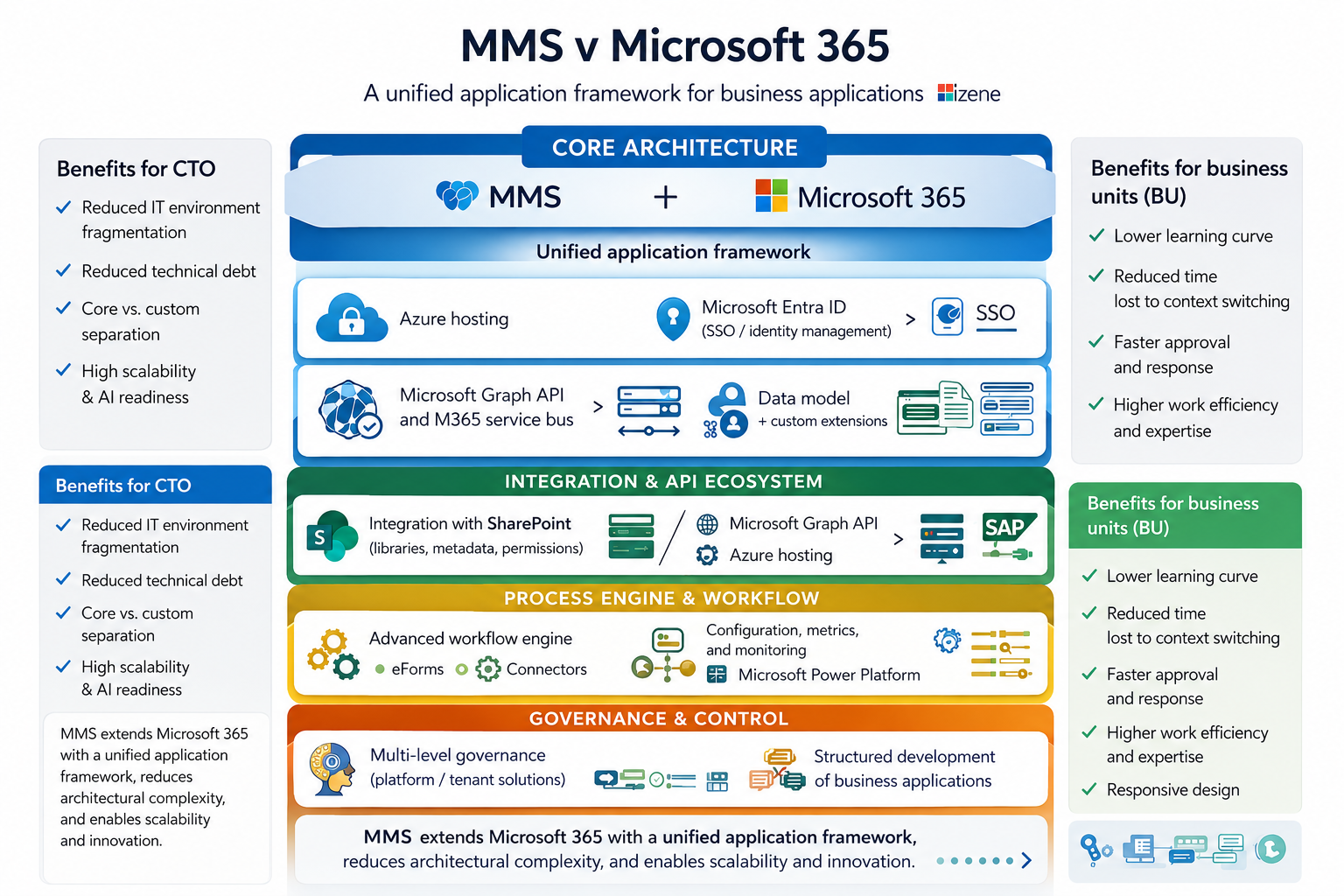
MMS extends Microsoft 365 with a unified framework for managing workflows and provides an application platform for building enterprise solutions. Below are examples of how this approach has helped unify workflows, streamline process management, and reduce operational fragmentation.


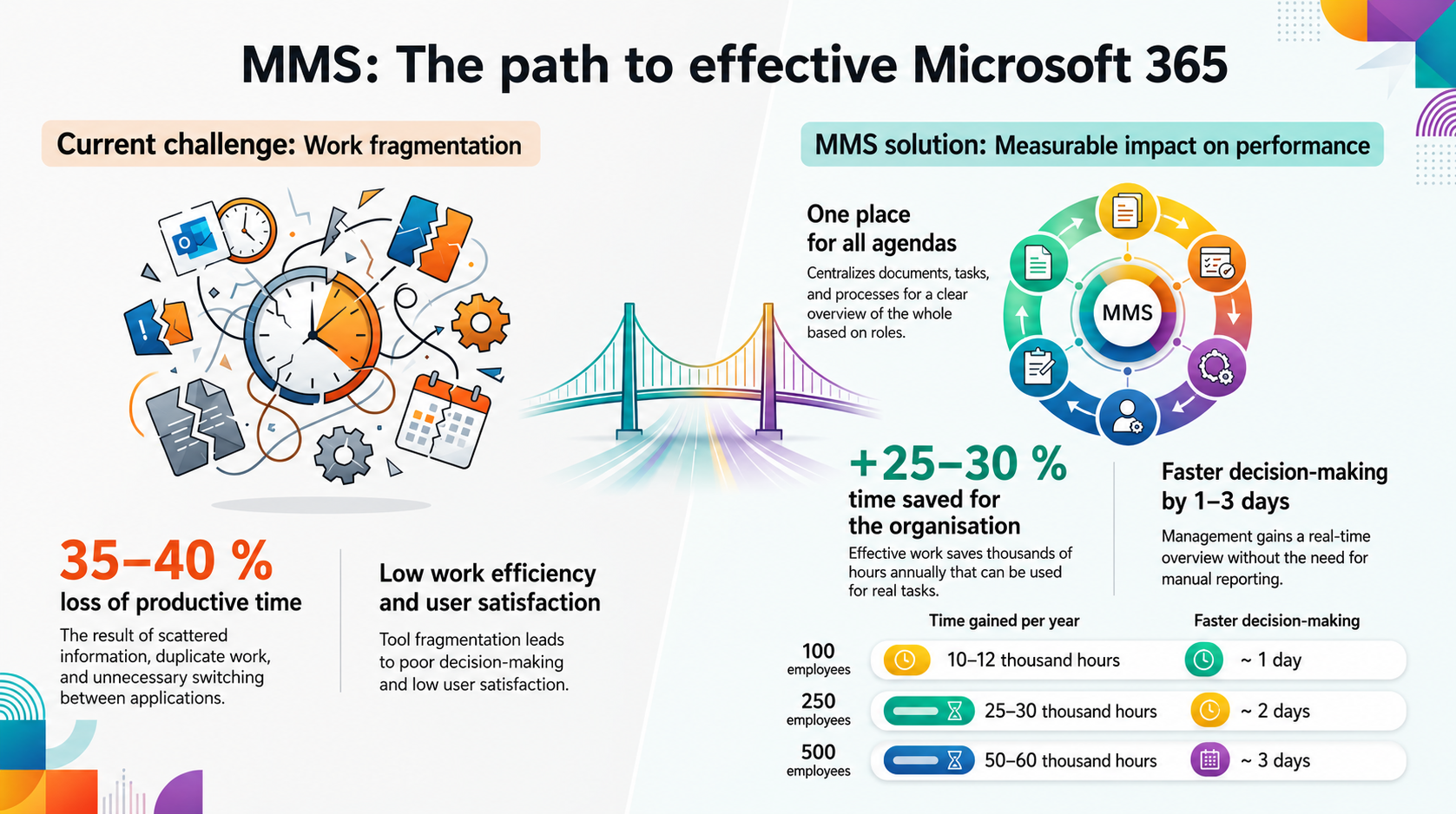
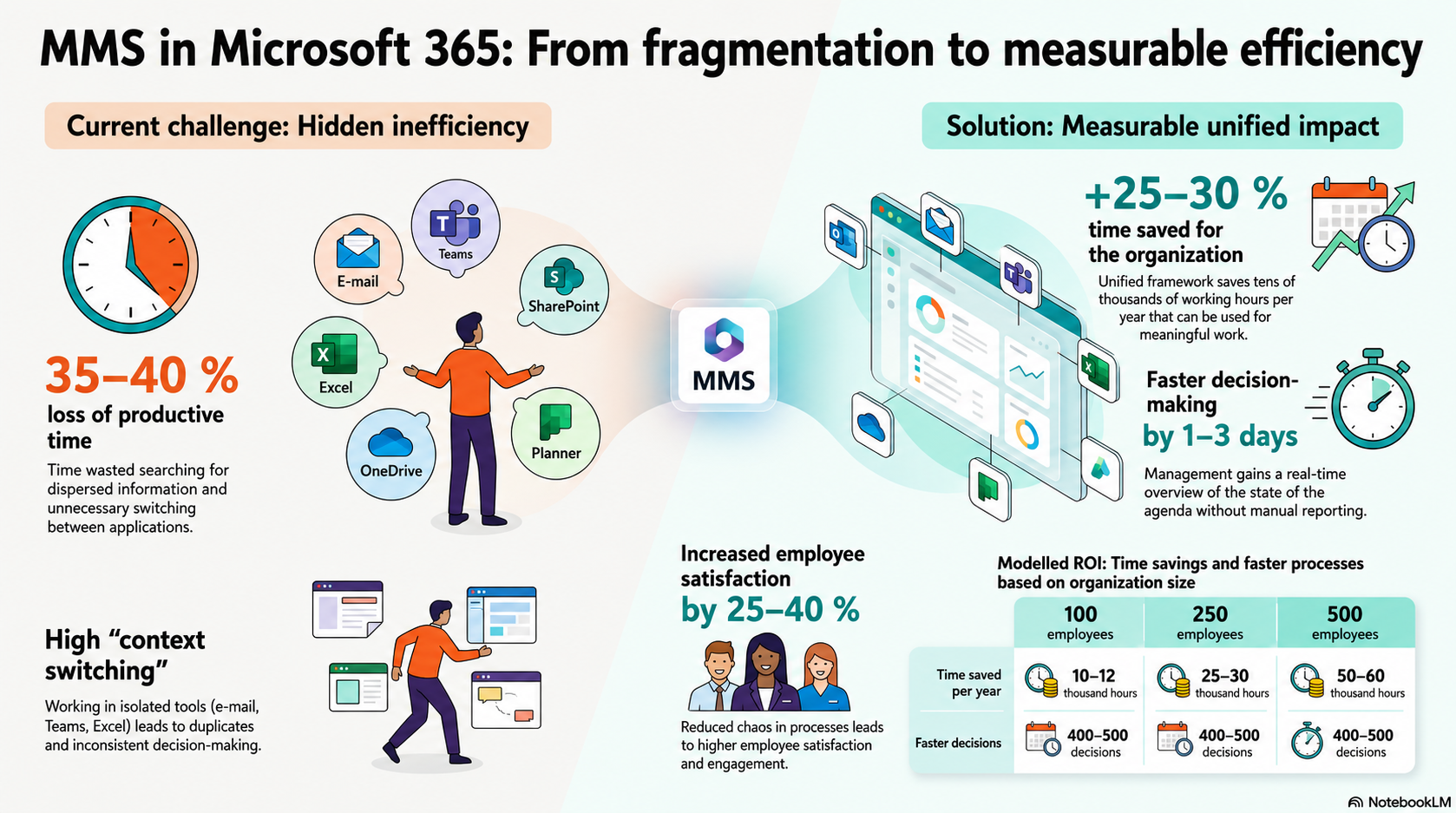
The Benefits of MMS in Numbers
Measurable impact following the implementation of a unified work framework in Microsoft 365.
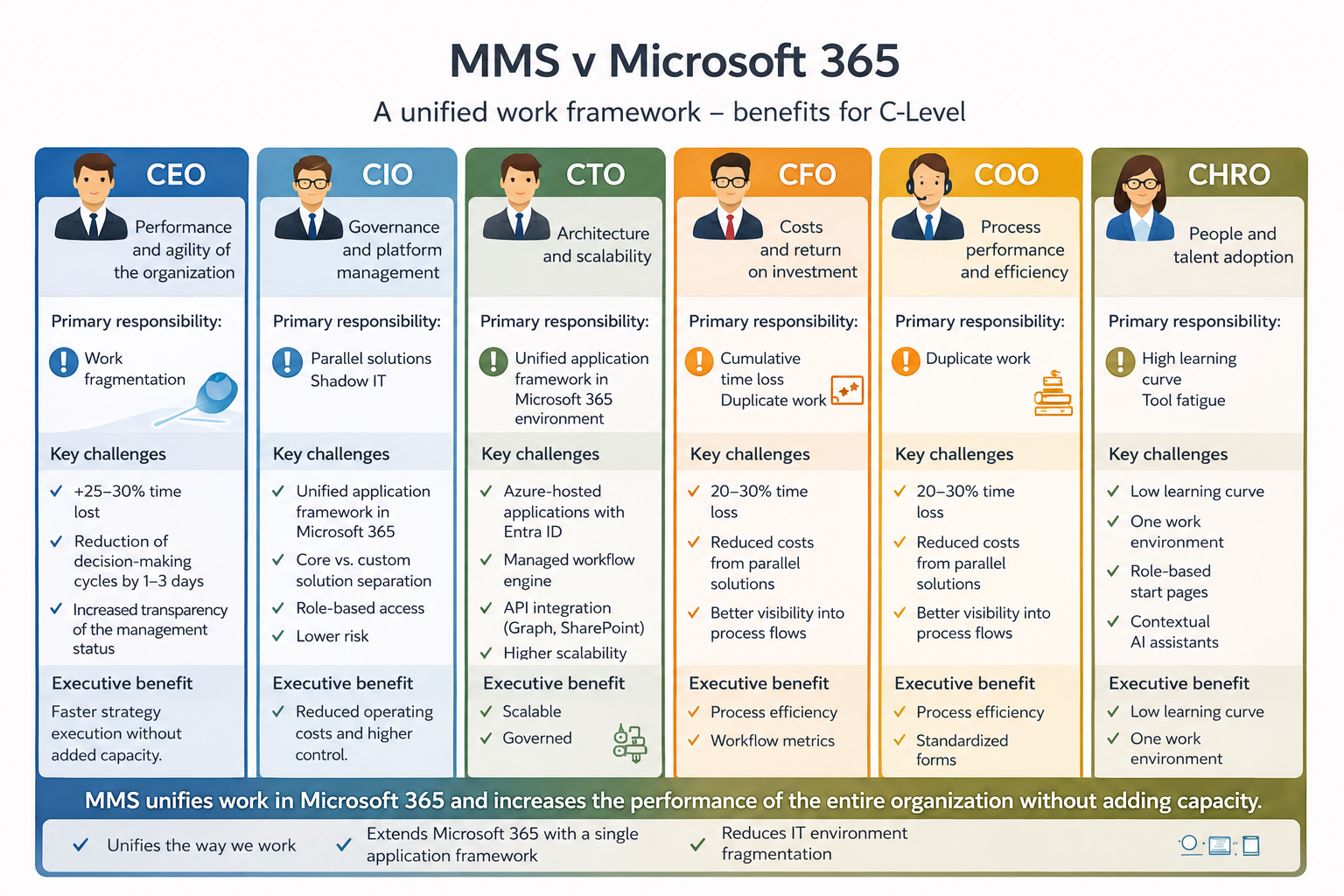
C-Level
A unified view of organizational performance without manual reporting. Measurable time savings, greater transparency, and faster strategic decisions.
CEO
An instant overview of the status of key initiatives and projects. Shorter decision-making cycles and better control over responsibilities without increasing headcount.
CIO
Reducing solution fragmentation and the use of parallel tools.
A unified application framework in Microsoft 365 with greater control over architecture and governance.
CTO
Separation of the core platform from customer-specific customizations and managed application development. A scalable architecture designed for integrations, workflows, and active use of AI.
Tool fragmentation and working out of context cost organizations tens of percent of their productive time.
The unified MMS application framework frees up 25–30% of time for actual work, speeds up decision-making by 1–3 days,
and reduces operational fragmentation across roles.
Thanks to this combination, the system remains clear, extensible, and ready to grow alongside your company.
MMS Case Studies
Real-world scenarios demonstrating the deployment and operation of MMS.
Consolidating dozens of the organization's systems into a single managed environment
Initial state
The organization managed a wide range of programs across various fields:
-
Service Management – all aspects of service provision
-
Human Resources and Employee Lifecycle – human resources management, including both internal and external staff
-
Finance and Accounting – financial relationships and obligations
-
Contracts and Documentation – management of corporate documents and communications
-
Operations and Organizational Assets – day-to-day management of buildings, facilities, and access
The technological foundation was the SharePoint platform (Online / On-Premise).
At the same time, the organization was considering a custom solution using Power Automate and Power Apps.
The problem
The original condition was characterized by:
- fragmented applications and records
- multiple Excel files
- different access models
- limited data integration
- manual reporting
- high dependence on specific users
A proof of concept (PoC) was implemented using Power Automate and Power Apps to verify the feasibility of developing a unified solution in-house.
Testing confirmed that the individual scenarios worked, but it also revealed that:
- high demands on long-term maintenance
- the need to build a custom application architecture
- the risk of fragmented development without a unified framework
- dependence on key internal resources
After comparing the options, it was decided to migrate all operations to the MMS platform.
Solution
MMS has developed a unified application layer on top of the SharePoint platform:
Consolidation of Workflows
All operational, client, and administrative workflows have been consolidated into a single managed environment.
Shared Data Model
Links have been established between key entities (e.g., client – contract – payment – document – task).
Unified access framework
Roles and permissions were standardized across the organization.
Controlled application framework
Instead of isolated Power applications, a unified architecture with controlled management and development was created.
Centralized reporting and dashboard
Management gained an overview of the entire organization’s operations in one place.
Benefits
- Elimination of parallel applications and Excel spreadsheets
- Unified information architecture
- Reduction of long-term technical and operational complexity
- Reduced reliance on custom development
- Greater control over data and permissions
- Streamlined management of the entire organization
The decision not to introduce additional standalone Power applications, but rather to build a unified application layer, enables the organization to achieve long-term sustainable development.
Project and Operational Management in Microsoft 365
Initial state
-
The organization is implementing several major projects alongside a number of smaller operational ones.
-
It relies heavily on Microsoft 365 for its work—particularly Planner, email, Teams, SharePoint, and OneNote.
-
The tools work, but work spans multiple applications and lacks a unifying structure.
-
Documents stored across various repositories without a clear link to projects and agendas.
-
uplicate files, parallel communication in email and Teams.
-
Very limited visibility into the current status of the project.
The problem
As the project progressed, the limitations of standard Microsoft 365 usage began to become apparent:
- Documents stored in various libraries with no clear link to decisions
- Tasks in Planner separated from the project context
- Key communications scattered across email and Teams
- Notes in OneNote with no connection to specific actions
- Duplicate versions of documents
Keeping track of the project’s current status required constantly switching between applications.
This led to inconsistencies that necessitated regular coordination meetings, and it all resulted in delays and frustration. Microsoft 365 provided tools, but not a unified project management system
Solution
MMS serves here as a unifying application layer that extends Microsoft 365.
-
Projects and tasks are organized into a structured workflow.
-
Record relations→ Documents → Approvals → Responsible roles.
-
A centralized dashboard instead of switching between applications.
-
Elimination of duplication through controlled record-keeping.
-
Tasks are not isolated items, but part of a controlled context.
-
anagement now has a dashboard showing the project status without having to switch between applications.
M365 remains the technological foundation, but management takes place in a single environment.
Result
- A single source of truth for the entire project
- Elimination of duplicate documents
- Reduced time needed to get up to speed on the project
- Clearly defined responsibilities
- Clear overview of task progress
Controlled document management as a unified process and information system within Microsoft 365
Initial state
The organization managed controlled documentation using a combination of tools within Microsoft SharePoint and supplementary records:
- documents stored in libraries without unified lifecycle control
- processes (creation, review, approval) handled via email or outside the system
- inconsistent handling of logical document groupings
- employee acknowledgment tracked without control or verification
- limited linkage between documents, responsibilities, and processes
- inconsistent access models across departments
The solution was not a standalone system, but a fragmented set of tools without unified application logic.
The problem
The original setup resulted in recurring limitations:
- absence of end-to-end document lifecycle management (from draft to archive)
- unclear responsibilities across process stages
- low visibility into document status
- difficulty identifying the latest version and tracking changes
- formal processes (approval, publication, acknowledgment) occurring outside the system
- manual tracking and compliance control
- high administrative overhead
Attempts to address this using Microsoft Power Automate and Microsoft Power Apps confirmed feasibility of isolated scenarios, but also exposed:
- the need to design a custom process framework
- risk of inconsistent implementations
- high long-term maintenance and development costs
- dependency on specific internal resources
Solution
Within MMS (Module Management System), ISMS was implemented as a controlled agenda within Microsoft 365:
Controlled Document Lifecycle
- unified workflow: draft → review → completion → approval (e-signature) → publication → acknowledgment → archiving
- clearly defined process roles (Author, Reviewer, Commenter, Approver)
Document Sets as Core Entity
- grouping documents into logical units (sets)
- shared metadata, status, and process control at the set level
Unified Process Framework
- all documents and sets follow the same governance model
- elimination of ad-hoc and unmanaged workflows
Acknowledgment Tracking
- structured assignment of acknowledgment obligations by organizational units
- automated notifications and confirmation tracking
Integration with Microsoft 365
- controlled storage of documents in SharePoint libraries
- process-driven permission management (permissions, versioning, audit)
- extended by MMS with an application and process layer
Visibility and Control
- real-time overview of document and set statuses
- monitoring of obligations (approvals, acknowledgments)
- management-level reporting
- collections as a logical work layer for aggregation, views, and operational work
Benefits
- fully controlled document lifecycle
- clear roles and responsibilities across processes
- elimination of email- and Excel-based document management
- centralization of documents, processes, and information
- ensured compliance and auditability
- reduced administrative overhead
- improved transparency and control over documentation status
Summary
The transition from a fragmented toolset to a controlled ISMS agenda in MMS represents a structural shift:
- from document storage → to document governance
- from individual practices → to a unified process
- from supporting tools → to a system
The key value is not document digitization, but the introduction of a unified application layer governing lifecycle, responsibilities, and relationships across the organization.
Replacing the Excel-based freight management process
Initial state
The organization handles premium freight between its production facilities. For a long time, the process relied on a shared Excel spreadsheet supplemented by email communication. Excel served as the primary tool for recording, tracking, and approving shipments.
- Premium freight are handled via email and spreadsheets.
- Communication between plants lacks a unified system.
- Paper-based approval process.
- Difficult to track for audit purposes.
The problem
The goal was to replace the existing process, which exhibited all the typical characteristics of an Excel-based system:
- Manual data entry
- Duplicate file versions
- Lack of validation for required fields
- Unclear status of requests
- Limited traceability of change history
- High dependence on specific users
- Inability to filter and generate reports effectively
- Difficulty navigating large datasets
From the system's perspective, there was no workflow.
From the users' perspective, errors, duplications, and ambiguities arose.
From management's perspective, there was no immediate overview available.
Excel functioned as a spreadsheet, not as a management process.
Solution
A specialized module for managing premium freight has been developed in MMS:
- Structured input form with data validation
- Clearly defined state model (submission → review → approval with escalation → execution → closure)
- cross-plant approval workflow
- automatic notifications to responsible parties
- complete history of changes and decisions
- filtering and export capabilities
- reporting and overviews by location, transport type, or status
- SAP data import/export
The process was migrated from a spreadsheet to a managed system integrated with other systems.
Benefits
- Elimination of parallel versions and duplicates
- Reduction of errors caused by manual transcription
- Significant improvement in the speed of accessing shipment history
- Transparent accountability between plants
- Audit readiness
Premium freight shipments are no longer simply recorded in a file; they have become a managed process with a controlled flow of information.
Automation of employee onboarding and transfers
with distributed responsibility and automated access controls
Initial state
The organization needed to manage employee onboarding, internal transfers, and departures across multiple departments and application systems.
The process involved:
- employee supervisors
- line managers
- BU application owners
- HR as the process owner
- IT as the security guarantor
This included integration with the employee database and the management of positions, profiles, and application suites.
The problem
Before the solution was implemented, the process was partially manual and uncoordinated:
- Responsibilities were not systematically assigned based on relevance
- Changes in roles did not automatically result in changes to permissions
- Access rights were configured on a case-by-case basis
- Onboarding was unnecessarily slow
- Downtime occurred during changes
- There was no central overview of open cases
- Reporting was limited
Neither HR nor IT could effectively manage the entire process—they only handled their respective parts.
However, the primary responsibility lay with the managers and application owners.
There was no system in place to support this management model.
Solution
MMS has implemented a role-based employee lifecycle management process:
- Centralized database of job positions and profiles
- Definition of application suites and permissions by role
- Automated management of access to systems and devices based on assigned profiles
- Workflow organized by area of responsibility
- Supervisor approves the need for a role
- Business Unit (BU) owner confirms application access
- HR manages the process as its owner
- IT ensures security and access control
- integration with the employee records system
- reporting and overviews of case status and access permission
The process was not centralized within HR or IT - it was managed in a decentralized manner based on responsibilities.
Benefits
- Faster onboarding and role changes
- Minimized operational downtime
- Automated and consistent access management
- Clear accountability based on organizational roles
- A complete overview of who has which permissions and why
- Readiness for audits and security reviews
HR remains the owner of the process.
IT ensures security.
Responsibility for permissions aligns with the organizational structure.
The process has thus become a managed system, not merely administrative coordination.
cImplementation of a system for managing production changes and technical requirements using custom decision matrices
Initial state
The manufacturing organization needed to manage a wide range of technical and operational requirements, particularly in the following areas:
- engineering changes in production
- management of machinery and equipment throughout their lifecycle
- relocation, storage, and disposal of assets
- control and inspection processes
- operational and organizational changes at production centers
Each area had its own decision-making logic and distinct approval roles.
Historically, the process was managed using a combination of Access, Excel, and email communication.
The problem
The original model had structural weaknesses:
- fragmented records organized by request type
- lack of a unified state model
- inconsistent decision-making rules
- lack of a formal approval matrix
- limited validation of input data
- weak integration with existing data sources
- manual reporting
- difficult audit traceability
As the number of requests grew, the process became unmanageable as a whole.
Access and Excel tracked items but did not provide control over the flow of responsibilities.
Solution
A unified framework for managing technical and production requirements has been established in MMS, which enables:
Thematic categorization of requirements:
Requirements are divided into logical areas (changes, assets, inspections, operational interventions), each with its own structure and rules.
Individual decision matrices by area:
- defined approver roles
- sequential or parallel approval
- conditional process branching
- clearly defined responsibilities
Data integration and control mechanisms:
- connection to internal data sources (e.g., machines, cost centers, ERP)
- status-based automatic notifications
- input data validation rules
- data completeness checks
- exports and reports for reporting
Transparent status model:
Each request goes through controlled phases from submission to closure, with a complete history of decisions.
Benefits
- Consolidation of production and technical requirements into a single managed system
- Standardization of decision-making rules
- Faster response times to changes
- Reduced administrative burden
- Full audit traceability
- Centralized reporting across production
Change and asset management has shifted from isolated records to a structured governance framework that supports production, quality, and management.
A phased transition to MMS + a managed implementation model
This use case is not about a specific process.
It is about a model for managing change and implementing the platform without unnecessary transformation risks.
Initial state
Customer Prototype (PoC / MVP) – The organization needs to migrate key processes to a unified system, but it rejected:
- a large-scale one-time implementation
- lengthy analytical phases with no tangible results
- dependence on a vendor without internal control over the design
The goal is to validate the solution in practice and minimize the risk of an incorrect scope definition.
The problem
Typical risks of similar projects:
- overestimating the scope in the initial phase
- vaguely defined scope
- late discovery of process deficiencies
- high costs associated with changes during implementation
- disconnect between the design and actual user practices
The organization needed a model that would enable it to:
- verify functionality
- engage key users
- manage scope
- proceed iteratively
Without a controlled framework, the project would carry a high transformation risk.
Solution
A proven three-phase model for managed implementation:
1. Customer Prototype (PoC / MVP)
The customer has prepared a basic prototype of the application within the platform.
- data structure
- workflow logic
- user scenarios
The goal is to verify that the desired solution has been achieved.
Without extensive customization. - Without extensive customization.
2. ASAP EM Support
We provide ongoing support:
- architectural validation
- technical support
- best practice recommendations
The goal is to ensure design quality without sacrificing flexibility.
3. Transition from prototype to production environment
After verifying functionality:
- The scope of the solution has been defined
- The boundary between standard functionality (CORE) and required extensions has been established
- Decisions regarding the implementation of custom modifications have been made
- The solution has been stabilized for long-term operation
The implementation is therefore based on a proven design, not on theoretical analysis.
Benefits of the model
- Minimization of implementation risk
- Clearly defined scope
- Involvement of key users from the outset
- Limitation of costly changes in later phases
- Sustainable architecture without unmanaged customizations
Instead of a one-time transformation, a controlled evolutionary process emerges that is predictable, scalable, repeatable across other areas, and has a low organizational burden.

Agendas and Projects
Teams & Agendas
Reports & Views
Now let’s look at how MMS works with data and artificial intelligence.